Best Phone Gimbal Stabilizers in 2026
Four smartphone gimbals compared, from an Apple DockKit tracker with a built-in tripod to creator-focused models with fill lights, and when a gimbal beats your phone's own stabilization.
- 4 picks
- 4 min read
- Updated Nov 20, 2026
As an Amazon Associate I earn from qualifying purchases. If you buy through a link here we may earn a commission, at no extra cost to you. Details
Modern phones already stabilize video impressively, so a gimbal has to earn its place. It does that with smooth, deliberate camera moves: long walking shots without the bob of each step, slow pans and tilts, and subject tracking that keeps you in frame while you move around a room or film a product demo.
Today's phone gimbals are also more than stabilizers. Many fold into a pocket-sized package with a built-in extension rod and tripod, and some track faces and bodies automatically, either through their own app or, on iPhone, through Apple's DockKit, which works with the built-in Camera app. We compared gimbals from Insta360, Zhiyun and Hohem on tracking, phone compatibility, built-in accessories, controls, portability and app support, and picked the best for iPhone users, creators, beginners and travelers.
The lineup
 Best for creators Zhiyun Smooth 5S AI
Creators who want manual control and a fill light
8.9 Buy Now on Amazon
 Best compact budget pick Zhiyun Smooth-Q4
Casual travel video and beginners
8.1 Buy Now on Amazon
 AI picture
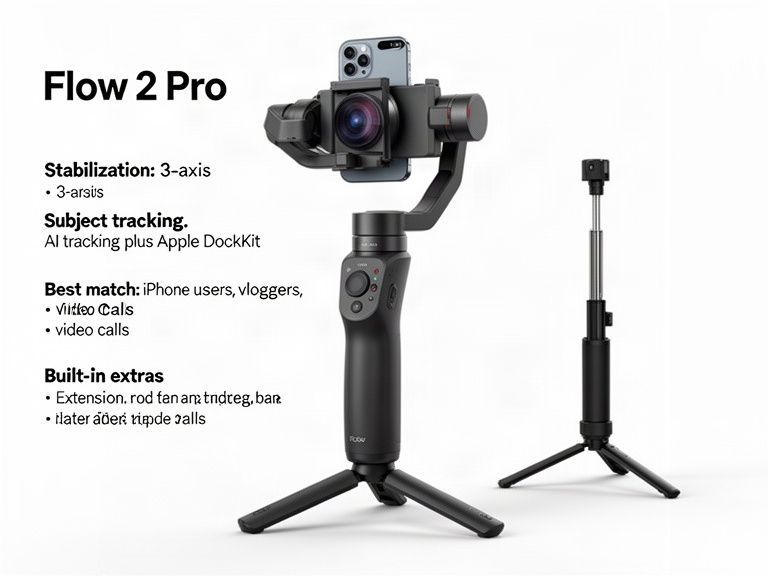
- Stabilization3-axis
- Subject trackingAI tracking plus Apple DockKit
- Best matchiPhone users, vloggers, video calls
- Built-in extrasExtension rod and tripod
- DesignFolding, magnetic phone clamp
#1Best overall9.2/10
Insta360 Flow 2 Pro
Insta360
A folding 3-axis gimbal with AI tracking, Apple DockKit support and a built-in selfie stick and tripod.
Good for: iPhone users and solo creators
- Apple DockKit tracking in the iPhone Camera app and supporting apps
- Built-in extension rod and tripod
- Folds small for travel
- Also tracks through Insta360's app on Android
- Premium-priced
- Best features favor iPhone
- Heavy phones with accessories reduce battery life
The Insta360 Flow 2 Pro is the most complete phone gimbal for most people, and especially for iPhone owners. Its standout feature is Apple DockKit support: the gimbal can track you in the iPhone's own Camera app and in third-party apps that support DockKit, so automatic tracking works in video calls and recording apps without switching to a special app.
It also brings Insta360's AI tracking through its own app on iPhone and Android, plus a built-in extension rod and tripod that make it a selfie stick and timelapse stand as well. A magnetic clamp makes attaching the phone quick, and the whole thing folds small enough for a jacket pocket.
It is premium-priced, and Android users miss out on DockKit. For iPhone creators who film themselves, it is the easiest gimbal to live with.
The short version: The best all-round phone gimbal, and the obvious pick for iPhone owners.
AI picture- Stabilization3-axis
- Subject trackingDetachable AI tracking module
- Best matchCreators, product and B-roll shots
- Built-in extrasFill light, control wheel
#2Best for creators8.9/10
Zhiyun Smooth 5S AI
Zhiyun
A full-size 3-axis gimbal with a detachable AI tracking module, a built-in fill light and pro-style controls.
Good for: Creators who want manual control and a fill light
- Full-size motors and grip for steady control
- Built-in fill light for faces and products
- Control wheel and buttons for smooth manual moves
- Detachable AI module adds automatic tracking
- Bulkier than folding gimbals
- Heavier to hold through long shoots
- More controls to learn
Zhiyun's Smooth 5S AI is aimed at people who want to direct their shots rather than just stabilize them. It is a full-size 3-axis gimbal with a grip full of controls, including a control wheel for zoom and smooth adjustments, so you can make deliberate camera moves without touching the screen.
A built-in fill light helps with faces and product shots in dim rooms, and the AI version adds a detachable tracking module that follows subjects automatically.
The trade-offs are size and complexity. It is bulkier than folding gimbals like the Flow 2 Pro, and there are more buttons and modes to learn. If you shoot regular content and want control, that is a fair exchange.
The short version: The creator's choice for controlled, well-lit phone video.
 AI picture
- Stabilization3-axis
- Subject trackingAI tracking
- Best matchSolo filming, workouts, vlogs
- DesignFoldable
#3Best value AI tracking8.5/10
Hohem iSteady V3
Hohem
A foldable 3-axis gimbal from Hohem built around AI subject tracking for hands-free filming.
Good for: Solo filming on a budget
- AI tracking for hands-free solo filming
- Foldable for travel
- Mid-priced compared with premium rivals
- Hohem makes a wide range of phone gimbals
- Less polished app experience than Insta360
- Check the payload with heavy phones
Hohem markets the iSteady V3 as a personal AI videographer, and that sums up its appeal: it is a foldable 3-axis gimbal built around automatic subject tracking, so it can keep you in frame while you record a workout, a cooking demo or a walk-and-talk vlog.
It costs less than the premium options here, and its foldable design suits a bag. Hohem has a long history with phone gimbals and offers several models, including larger ones for heavy phones, if the V3 isn't a match.
Expect a less refined app and software experience than Insta360's, and check the supported payload if you use a large phone in a thick case.
The short version: A capable, good-value gimbal for people who mainly want automatic tracking.
AI picture- Stabilization3-axis
- Subject trackingThrough the Zhiyun app
- Best matchBeginners and travel
- Built-in extrasExtension rod
- DesignFoldable
#4Best compact budget pick8.1/10
Zhiyun Smooth-Q4
Zhiyun
A compact, foldable 3-axis gimbal with a built-in extension rod for everyday and travel video.
Good for: Casual travel video and beginners
- Small and foldable
- Built-in extension rod for selfie angles
- Budget-friendly
- From an established gimbal maker
- Older design than newer AI models
- Tracking relies on the app
If you want smoother travel and family video without spending much, Zhiyun's Smooth-Q4 is a sensible starting point. It folds compactly, and a built-in extension rod gives you higher or wider selfie angles without a separate stick.
The 3-axis stabilization smooths out walking shots and lets you make simple pans, while tracking is handled through the Zhiyun app.
It is an older design than the AI-tracking models here, and app-based tracking won't work in your phone's own camera app. For beginners who mostly want steadier everyday video, though, it covers the essentials, and its small folded size means it is more likely to come along on a trip than a full-size gimbal.
The short version: A simple, affordable gimbal for steadier everyday and travel video.
Compare at a glance
| Pick | Stabilization | Subject tracking | Best match | Built-in extras | Score |
|---|---|---|---|---|---|
| #1 Insta360 Flow 2 Pro | 3-axis | AI tracking plus Apple DockKit | iPhone users, vloggers, video calls | Extension rod and tripod | 9.2 |
| #2 Zhiyun Smooth 5S AI | 3-axis | Detachable AI tracking module | Creators, product and B-roll shots | Fill light, control wheel | 8.9 |
| #3 Hohem iSteady V3 | 3-axis | AI tracking | Solo filming, workouts, vlogs | — | 8.5 |
| #4 Zhiyun Smooth-Q4 | 3-axis | Through the Zhiyun app | Beginners and travel | Extension rod | 8.1 |
Specs come from manufacturer listings when we wrote this guide and can change between production runs.
Buying tips
Do you need a gimbal?
Your phone's built-in stabilization handles casual handheld video well, especially in action or cinematic modes. A gimbal is worth it if you:
- film long walking or moving shots and want them to look glided rather than handheld;
- want smooth, controlled pans and tilts, or timelapses with motion;
- record yourself alone and want the camera to follow you automatically;
- shoot in low light, where electronic stabilization can introduce blur.
Subject tracking and DockKit
Tracking keeps a face or body centered as you move. Some gimbals track through their own app, others use a small AI module on the gimbal that works with any camera app. On iPhone, Apple DockKit support lets a compatible gimbal track you in the built-in Camera app and in third-party apps that support DockKit, such as video calling apps, without a special app.
Phone size and payload
Every gimbal has a maximum payload. Large Pro Max and Ultra phones, especially in cases or with add-on lenses or magnetic lights, can approach the limit, making the motors work harder and drain the battery faster. Check the supported weight and width, and balance the phone in the clamp as the manufacturer describes.
A balanced phone is the key to smooth footage: if it tips to one side when the gimbal is switched off, slide it in the clamp until it sits level. Many gimbals work best with the case removed, and magnetic clamps need a flat back to grip properly, so bulky camera bumps and grips can get in the way.
Built-in extras
- An extension rod for selfie angles and group shots.
- A built-in tripod for timelapses and hands-free recording.
- A fill light for faces in dim rooms.
- A control wheel or joystick for zoom and smooth manual moves.
- A folding design if it will live in a bag.
- USB-C charging, ideally with the option to top up your phone from the gimbal's battery.
App dependence
Many advanced features, such as timelapses, special panoramas and some tracking modes, need the gimbal maker's app. Check that the app supports your phone and keeps up with phone software updates, and remember that app-only features won't work in your favorite camera app.
Care tips
Fold or lock the gimbal as the manual describes before packing it, never force the motors by hand while powered on, keep the clamp clean, and charge the battery every few months if it is stored.
FAQ
QIs a gimbal better than my phone's built-in stabilization?
For casual clips, built-in stabilization is often enough. A gimbal is better for long walking shots, smooth pans and tilts, low-light video and automatic tracking.
QWhat is Apple DockKit?
DockKit is an Apple framework that lets compatible motorized stands and gimbals track subjects using the iPhone's own camera software. Tracking works in the built-in Camera app and supporting third-party apps, with no extra app needed.
QWill a gimbal work with my large phone and case?
Check the gimbal's payload and clamp width. Large phones in thick cases or with add-on lenses may exceed the limit and cause shaky motors.
QDo phone gimbals work with Android phones?
Yes. Stabilization works with any phone that fits the clamp. Some tracking and app features differ between iPhone and Android, and DockKit is iPhone-only.
QWhy does my gimbal drift or shake?
Usually the phone is off-center in the clamp, the phone is too heavy, or the gimbal needs recalibrating. Re-balance the phone and follow the calibration steps in the app.
How we picked
We compared stabilization design, subject tracking methods, Apple DockKit support, payload and clamp size, built-in extension rods, tripods and lights, controls, portability and app support for smartphone gimbals from Insta360, Zhiyun and Hohem, using manufacturer specifications. Our picks and scores are based on this research — we have not tested these products hands-on. Brands cannot pay to be included. Read our full method.
In the same aisle
More phone gimbal stabilizers to browse
A random pull from our product catalog, not ranked or reviewed.