Best Streaming Media Players in 2026
Six streaming sticks and boxes compared — Roku, Apple TV, Google TV and Fire TV — to give an older or sluggish TV a faster, simpler way to watch.
- 4 picks
- 5 min read
- Updated Nov 20, 2026
As an Amazon Associate I earn from qualifying purchases. If you buy through a link here we may earn a commission, at no extra cost to you. Details
A streaming media player is a small stick or box that plugs into your TV's HDMI port and gives it a complete set of streaming apps, a voice remote and regular software updates. Even if your TV is "smart," a dedicated player is often faster, gets updates for longer and may support apps or HDR formats your TV's built-in system doesn't.
The big decision is the ecosystem. Roku is the simplest and most neutral, Apple TV is the most polished for iPhone owners, Google TV is built around recommendations and casting, and Fire TV is designed around Alexa and Prime Video. After that, it comes down to HDR support, network connection, remote features and whether you want a compact stick or a more powerful box. We compared the most popular current players from Roku, Apple and Google on those points and picked the best for different homes.
The lineup
 Best overall Roku Ultra 4K Streaming Player
Main living-room TVs and anyone who wants simplicity
9.2 Buy Now on Amazon
 Best for Apple users Apple TV 4K
iPhone owners who want the most polished experience
9.1 Buy Now on Amazon
 Best for Google homes Google TV Streamer
Android users and Google Home households
8.9 Buy Now on Amazon
 Best budget Roku Streaming Stick Plus
Bedrooms, travel and upgrading an older TV cheaply
8.4 Buy Now on Amazon
AI picture
- Max resolution4K
- HDR formatsDolby Vision, HDR10+, HDR10, HLG
- NetworkWi-Fi 6 + Ethernet
- PlatformRoku OS
- RemoteBacklit, rechargeable voice remote with lost-remote finder
#1Best overall9.2/10
Roku Ultra 4K Streaming Player
Roku
Roku's top player combines fast performance, every HDR format, Ethernet and an excellent backlit remote.
Good for: Main living-room TVs and anyone who wants simplicity
- Simple, neutral Roku home screen
- Supports Dolby Vision and HDR10+
- Ethernet and Wi-Fi 6 for reliable 4K
- Excellent rechargeable remote with hands-free voice
- Box needs a spot near the TV
- Roku home screen includes some ads
- Overkill for a small bedroom TV
The Roku Ultra is the most capable Roku, and it pairs the platform's famously simple interface with hardware that suits a main TV. It supports Dolby Vision, HDR10+ and Dolby Atmos, so it can send the best versions of shows and films, and it has both Wi-Fi 6 and an Ethernet port for steady 4K streaming.
The remote is a big part of its appeal. It is backlit for dark rooms, rechargeable, supports hands-free voice commands and can be found with a lost-remote chime. Roku's search shows results from every service at once, ranked without favoring one company's content.
It's a box rather than a stick, so it needs a spot near the TV, and the Roku home screen does include some promotions. For a household that wants one remote and no fuss, it's the easiest recommendation.
The short version: The best streaming player for most living rooms: simple, fast and complete.
AI picture- Max resolution4K
- HDR formatsDolby Vision, HDR10+, HDR10, HLG
- NetworkWi-Fi; Ethernet on the higher-storage version
- PlatformtvOS
- RemoteSiri Remote
#2Best for Apple users9.1/10
Apple TV 4K
Apple
Apple's streaming box is fast, ad-light and tightly connected with the iPhone, AirPlay and Apple's services.
Good for: iPhone owners who want the most polished experience
- Very smooth, responsive interface with few ads
- AirPlay and iPhone integration
- Supports Dolby Vision and HDR10+
- Works as a home hub for Apple Home accessories
- Premium-priced compared with sticks
- Best features need an iPhone and Apple account
- Ethernet only on the higher-storage version
Apple TV 4K is the most polished streaming box you can buy. The interface is fast and uncluttered, apps open quickly, and there's very little advertising compared with other platforms. It supports Dolby Vision, HDR10+ and Dolby Atmos, and options to match frame rate and dynamic range help films look the way they were mastered.
For iPhone households, the integration is the real draw: AirPlay sends video and photos to the TV instantly, your iPhone can act as a keyboard or remote, and the box serves as a home hub for Apple Home smart devices.
It costs more than streaming sticks, and Android users won't get as much from it. Apple refreshes the hardware occasionally, so check that you're buying the current version.
The short version: The best player for Apple households and anyone who wants a fast, ad-light interface.
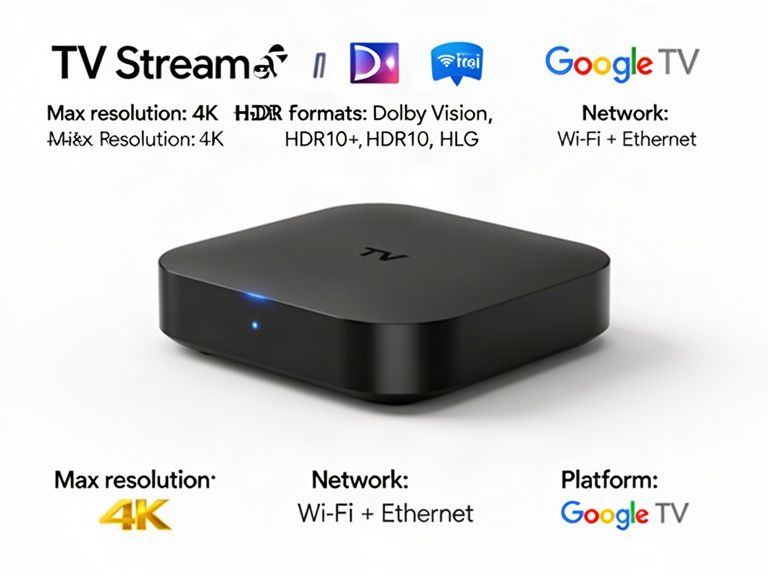
AI picture- Max resolution4K
- HDR formatsDolby Vision, HDR10+, HDR10, HLG
- NetworkWi-Fi + Ethernet
- PlatformGoogle TV
- Smart homeBuilt-in Matter and Thread hub
#3Best for Google homes8.9/10
Google TV Streamer
Google's streaming box adds strong recommendations, built-in casting and a smart home hub to any TV.
Good for: Android users and Google Home households
- Strong personalized recommendations
- Chromecast built in for casting from phones
- Acts as a Matter and Thread smart home hub
- Ethernet port and remote finder button
- Home screen leans on recommendations and ads
- Premium-priced for a box
- Less useful if you don't use Google services
Google TV is built around recommendations: it pulls shows from all your services into one feed, and Google's search and voice assistant make finding something quick. The Streamer is Google's own box for the platform, with support for Dolby Vision, HDR10+ and Dolby Atmos, plus an Ethernet port for steady 4K.
It is also a smart home device. It works as a Matter and Thread hub and includes a Google Home panel for checking cameras and controlling lights from the TV. Chromecast is built in, so anyone with a phone can cast video without signing in.
The home screen leans heavily on recommendations, which some people find busy, and it costs more than a stick. If your household runs on Android and Google Home, it's the natural pick.
The short version: The best choice for Google households that want casting and smart home control on the TV.
AI picture- Max resolution4K
- HDR formatsHDR10+, HDR10 (no Dolby Vision)
- NetworkWi-Fi 5
- PlatformRoku OS
- RemoteRoku voice remote
#4Best budget8.4/10
Roku Streaming Stick Plus
Roku
A tiny, budget-friendly 4K HDR stick that can draw power from the TV's USB port.
Good for: Bedrooms, travel and upgrading an older TV cheaply
- Very compact and easy to hide
- Can run from the TV's USB port
- Simple Roku interface
- Very budget-friendly
- No Dolby Vision support
- Older Wi-Fi standard than premium players
- No Ethernet option
Roku's Streaming Stick Plus is a small, budget-friendly way to add 4K HDR streaming to a TV. It's compact enough to tuck right behind the screen and can draw power from the TV's USB port, so in many setups you won't need a wall outlet at all.
You get the same simple Roku interface and search as on Roku's pricier players, along with a voice remote. It supports 4K with HDR10+ and HDR10.
The savings show in a few places: no Dolby Vision, older Wi-Fi and no Ethernet option, so it's less ideal for a main home-theater TV. For a bedroom, guest room, older TV or travel bag, it's hard to beat.
The short version: A great low-cost upgrade for secondary TVs and travel.
Compare at a glance
| Pick | Max resolution | HDR formats | Network | Platform | Score |
|---|---|---|---|---|---|
| #1 Roku Ultra 4K Streaming Player | 4K | Dolby Vision, HDR10+, HDR10, HLG | Wi-Fi 6 + Ethernet | Roku OS | 9.2 |
| #2 Apple TV 4K | 4K | Dolby Vision, HDR10+, HDR10, HLG | Wi-Fi; Ethernet on the higher-storage version | tvOS | 9.1 |
| #3 Google TV Streamer | 4K | Dolby Vision, HDR10+, HDR10, HLG | Wi-Fi + Ethernet | Google TV | 8.9 |
| #4 Roku Streaming Stick Plus | 4K | HDR10+, HDR10 (no Dolby Vision) | Wi-Fi 5 | Roku OS | 8.4 |
Specs come from manufacturer listings when we wrote this guide and can change between production runs.
Buying tips
Do you need one if your TV is already smart?
Often, yes. TV makers stop updating their software after a few years, and budget TVs can feel slow with modern apps. A streaming player is an inexpensive way to get a faster interface, current apps and better voice search. It's also the easy fix if your TV's platform is missing an app you use, or if you want the same interface on every TV in the house.
Pick your ecosystem
- Roku: the simplest home screen, neutral search across all services and a free live TV channel guide.
- Apple TV: smooth and ad-light, with tight iPhone, AirPlay, Apple Music and Apple Fitness+ integration.
- Google TV: strong recommendations, built-in Chromecast for casting from phones, and Google Home controls.
- Fire TV: built around Alexa and Prime Video, with Alexa smart home controls.
All of them carry Netflix, YouTube, Disney+, Max, Prime Video and the other major apps.
Specs that matter
- 4K and HDR formats: if you have a 4K HDR TV, look for Dolby Vision and HDR10+ support so services can send their best version. Match these to what your TV supports.
- Dolby Atmos audio: important if you have an Atmos soundbar or receiver.
- Networking: newer Wi-Fi standards (Wi-Fi 6 or 6E) and an Ethernet port give more reliable 4K streaming, especially if your router is far away.
- Remote: backlit buttons, a headphone jack or a lost-remote finder are small things you'll appreciate daily.
Stick or box?
Sticks hide behind the TV and are the most budget-friendly. Boxes usually have more processing power, Ethernet, better Wi-Fi and extras such as hands-free voice control or a USB port. If the TV is your main screen and you stream a lot of 4K, a box is worth the extra cost; for bedrooms and travel, a stick is plenty. If a stick won't fit behind a wall-mounted TV, a short HDMI extender cable usually solves it and can also improve Wi-Fi reception.
Setup tips
Plug the player directly into the TV's HDMI port and turn on HDMI-CEC in the TV settings, so one remote controls power and volume. Use the included wall adapter if the TV's USB port can't supply enough power. On players that offer it, turn on settings that match the frame rate and dynamic range to the content, so films don't switch to the wrong format. Finally, set up parental controls and separate profiles if kids share the TV.
FAQ
QDo streaming players charge a monthly fee?
No. You buy the device once. You still pay for any subscription services you sign up for, and each platform also offers free, ad-supported channels.
QWill a 4K streaming player work with a 1080p TV?
Yes. It will output 1080p to match your TV, and you'll be ready if you upgrade to a 4K TV later.
QDo I need Wi-Fi 6 or Ethernet?
Not always, but they help. If your player is far from the router or your 4K streams buffer, a player with newer Wi-Fi or an Ethernet port gives a more stable connection.
QCan I control my soundbar and TV with the streaming remote?
Usually. Most remotes control TV power and volume through HDMI-CEC or an infrared signal, which you enable during setup.
QIs a streaming stick good for travel?
Yes. A stick fits in a bag and plugs into hotel TVs with an open HDMI port. Some hotel networks need a sign-in page, which certain players handle better than others, so check before relying on it.
How we picked
We compared manufacturer specifications for current streaming sticks and boxes from Roku, Apple and Google — supported HDR and audio formats, Wi-Fi standard and Ethernet, remote features, smart home integration and platform — and weighed how each suits different ecosystems, TVs and budgets. Our picks and scores are based on this research — we have not tested these products hands-on. Brands cannot pay to be included. Read our full method.
In the same aisle
More streaming media players to browse
A random pull from our product catalog, not ranked or reviewed.