Best Streaming Webcams in 2026
Five streaming webcams compared — 1080p60 and 4K60 streaming cameras, a vertical-video option, a dependable budget pick and an AI-tracking 4K camera — plus lighting and setup tips.
- 5 picks
- 5 min read
- Updated Nov 20, 2026

As an Amazon Associate I earn from qualifying purchases. If you buy through a link here we may earn a commission, at no extra cost to you. Details
Your face cam is usually a small box in the corner of the stream, but it is what viewers connect with. A sharp, smooth, well-exposed image makes a channel look polished; a grainy, stuttering one distracts from the game. The good news is that a capable streaming webcam costs far less than a mirrorless camera setup and plugs straight in over USB.
The specs that matter for streaming differ slightly from video calls. Frame rate matters, because 60 frames per second looks smoother next to fast gameplay. Sensor quality matters, because most gaming rooms are dimly lit. And software controls matter, because automatic settings tend to flicker as your monitor's light changes. We compared popular webcams from established brands on resolution, frame rate, sensor, field of view, connection and software, and picked the best option for different streamers and budgets. One tip applies to all of them: good lighting improves any camera more than any upgrade.
The lineup
 Best 4K Elgato Facecam Pro 4K60 Webcam
Full-screen camera segments and YouTube recording
8.9 Buy Now on Amazon
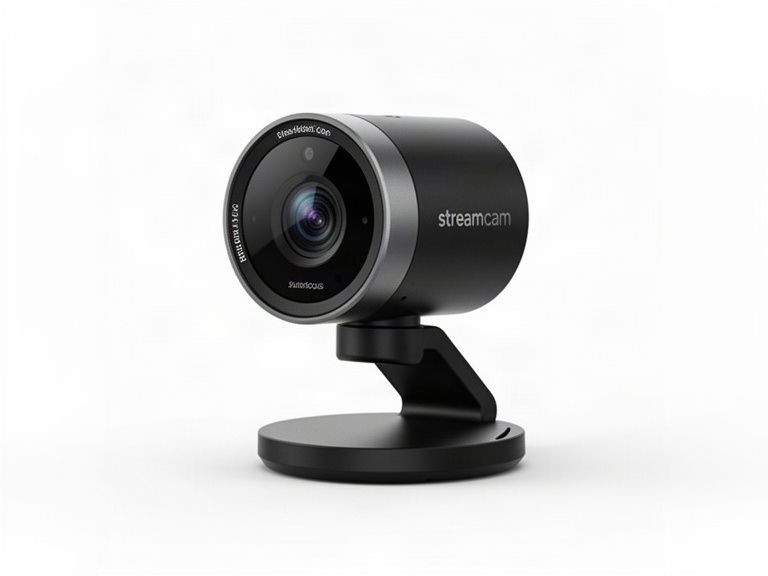 Best for vertical video Logitech StreamCam
Streamers who also make vertical clips
8.6 Buy Now on Amazon
 Best AI tracking OBSBOT Tiny 2 4K PTZ Webcam
Streamers who move around on camera
8.5 Buy Now on Amazon
 AI picture
- Max video1080p60 (uncompressed over USB 3.0)
- ConnectionUSB-C
- MicrophoneNone
- FocusFixed
- Field of view84 degrees
#1Best overall9.1/10
Elgato Facecam MK.2 Streaming Webcam
Elgato
A streaming webcam with uncompressed 1080p60 video over USB 3.0, a Sony STARVIS sensor, HDR and detailed software controls.
Good for: Most streamers at 1080p
- Clean, uncompressed 1080p60 video
- Sony STARVIS sensor handles dim rooms well
- Detailed manual controls in Elgato Camera Hub
- Fixed focus avoids hunting when you lean back
- No built-in microphone
- Fixed focus is not ideal for showing objects up close
- Needs a USB 3.0 port for uncompressed video
The Facecam MK.2 is built specifically for streaming. It sends uncompressed 1080p60 video when connected to a USB 3.0 port, which looks cleaner than the compressed video most webcams send and avoids extra work for your PC. A Sony STARVIS sensor helps in the dim lighting typical of gaming rooms, and HDR helps balance bright and dark areas.
Elgato's Camera Hub software gives fine control over exposure, white balance and image settings, and saves them so your look stays consistent between streams. The lens is fixed focus with a field of view of about 84 degrees, which suits a typical desk framing and avoids autofocus hunting.
There is no microphone, which is a deliberate choice: Elgato expects you to use a dedicated mic. If you often hold items up to the camera, an autofocus model suits better.
The short version: The best 1080p60 webcam for streamers who want a clean, consistent image they can fine-tune.
AI picture- Max video4K60
- ConnectionUSB-C (USB 3.0)
- MicrophoneNone
- SensorSony STARVIS
#2Best 4K8.9/10
Elgato Facecam Pro 4K60 Webcam
Elgato
A premium streaming webcam that records 4K at 60 frames per second with a large Sony STARVIS sensor.
Good for: Full-screen camera segments and YouTube recording
- 4K at 60 fps gives room to crop and zoom
- Large sensor for cleaner low-light video
- Detailed control through Camera Hub
- Good for full-screen and recorded content
- Premium-priced
- No built-in microphone
- 4K60 needs a capable PC and USB 3.0
The Facecam Pro is for creators who use their camera as more than a corner box. Recording 4K at 60 frames per second, it gives enough resolution to crop in tightly, zoom digitally, or fill the entire screen during talk segments without the image falling apart.
Its Sony STARVIS sensor is larger than typical webcam sensors, which helps keep noise down in typical gaming room lighting, and Elgato's Camera Hub provides the same detailed manual control as the rest of the Facecam range.
For a small face cam in the corner of a 1080p stream, the extra resolution is wasted, and the Facecam MK.2 is better value. It also needs a USB 3.0 port and a PC that can handle 4K60 video, and like other Facecams it has no microphone.
The short version: The pick for creators who want a 4K60 webcam for cropping, full-screen segments and recorded video.
AI picture- Max video1080p60
- ConnectionUSB-C
- MicrophoneBuilt-in
- FocusAutofocus
- MountingMonitor clip or tripod, rotates for vertical
#3Best for vertical video8.6/10
Logitech StreamCam
Logitech
A 1080p60 USB-C webcam that can mount in portrait orientation for vertical video, with autofocus.
Good for: Streamers who also make vertical clips
- Smooth 1080p60 video
- Rotates for vertical video
- Autofocus handles moving closer to the camera
- Compact and well built
- Smaller sensor struggles more in dim light
- Autofocus can hunt in some setups
- Built-in mic is basic
The StreamCam was one of the first webcams aimed squarely at streamers and creators, and its party trick is still useful: it can be mounted in portrait orientation, producing vertical video for short-form clips without cropping a landscape image.
It records smooth 1080p60 over USB-C, with autofocus that helps if you lean in or hold items up to the camera. It clips onto a monitor or screws onto a tripod, and Logitech's software provides controls for exposure, framing and color.
Its sensor is smaller than the Facecam's, so it needs good lighting to avoid noise, and autofocus can occasionally hunt when you move around. The built-in microphone is a backup at best.
The short version: A flexible 1080p60 webcam that suits streamers who also post vertical clips.
AI picture- Max video4K30, 1080p60
- ConnectionUSB-C
- MicrophoneBuilt-in dual mics
- FocusAutofocus
- TrackingMotorized pan and tilt with AI tracking
#4Best AI tracking8.5/10
OBSBOT Tiny 2 4K PTZ Webcam
OBSBOT
A 4K webcam on a motorized gimbal that tracks you automatically and responds to gestures and voice commands.
Good for: Streamers who move around on camera
- Motorized gimbal follows you around the room
- Gesture and voice controls
- Large sensor for a webcam
- Useful for dance, fitness and hands-on segments
- Premium-priced
- Tracking is unnecessary for a seated stream
- More settings to learn
The OBSBOT Tiny 2 sits on a small motorized gimbal that physically turns to follow you. For streamers who stand up, move around, demonstrate gear or switch between a desk and a sofa, it keeps you framed without a camera operator.
It records 4K at 30 frames per second or 1080p at 60, and its sensor is large for a webcam, which helps in dimmer rooms. You can control tracking and zoom with hand gestures or voice commands, and the companion software adds detailed image controls and preset positions.
If you sit at a desk for the whole stream, motorized tracking adds cost and complexity you will not use; the Facecam MK.2 is a better value there.
The short version: The pick for active streamers who want a camera that follows them automatically.
 AI picture
- Max video1080p30
- ConnectionUSB-A
- MicrophoneBuilt-in stereo
- FocusAutofocus
- ExtrasPrivacy shutter
#5Best budget8.2/10
Logitech C920s HD Pro Webcam
Logitech · Model C920s
A long-running 1080p30 webcam with autofocus, stereo microphones and a privacy shutter.
Good for: New streamers on a tight budget
- Budget-friendly and widely available
- Autofocus and decent 1080p image in good light
- Privacy shutter included
- Works with almost any app and computer
- Limited to 30 fps at 1080p
- Grainy in dim rooms
- Fewer manual controls than streaming-focused cameras
The C920 family has been one of the most common webcams on desks for over a decade, and the C920s version adds a privacy shutter. It records 1080p at 30 frames per second with autofocus and a pair of microphones, and works with nearly any computer and app over USB.
For a new streamer, it is a dependable starting point: in decent lighting, the image is clear and natural, and it is small enough in a corner overlay that 30 fps is not a problem for most viewers.
Its limits show in darker rooms, where the small sensor gets grainy, and in motion, where 30 fps looks less smooth than a 60 fps camera. Pair it with a simple light and it punches above its price.
The short version: A dependable, budget-friendly way to add a face cam to your stream.
Compare at a glance
| Pick | Max video | Connection | Microphone | Focus | Score |
|---|---|---|---|---|---|
| #1 Elgato Facecam MK.2 Streaming Webcam | 1080p60 (uncompressed over USB 3.0) | USB-C | None | Fixed | 9.1 |
| #2 Elgato Facecam Pro 4K60 Webcam | 4K60 | USB-C (USB 3.0) | None | — | 8.9 |
| #3 Logitech StreamCam | 1080p60 | USB-C | Built-in | Autofocus | 8.6 |
| #4 OBSBOT Tiny 2 4K PTZ Webcam | 4K30, 1080p60 | USB-C | Built-in dual mics | Autofocus | 8.5 |
| #5 Logitech C920s HD Pro Webcam | 1080p30 | USB-A | Built-in stereo | Autofocus | 8.2 |
Specs come from manufacturer listings when we wrote this guide and can change between production runs.
Buying tips
Resolution and frame rate
1080p at 60 frames per second is the sweet spot for streaming. Most platforms deliver 1080p or lower to viewers, and 60 fps keeps your movements smooth next to fast gameplay. 4K webcams are useful if you crop into the image, use the camera as a full-screen "just chatting" view, or record videos for YouTube. Many budget webcams are limited to 1080p at 30 fps, which is fine in a small corner box.
Lighting matters most
Even a premium webcam looks grainy in a dark room lit only by a monitor. A soft key light placed slightly above and in front of you makes a bigger difference than any camera upgrade. Avoid sitting with a bright window or lamp behind you. Larger sensors, such as the Sony STARVIS sensors used in some streaming cameras, cope better in low light, but they still benefit from good lighting.
Manual controls and software
Automatic exposure and white balance can shift constantly as your screen brightness changes, which looks distracting on stream. Webcams with good companion software let you lock exposure, focus and color, and save the settings on the camera itself. Fixed-focus cameras avoid the "hunting" some autofocus systems do when you lean back; autofocus is more useful if you show products or move toward the camera.
Field of view and framing
A field of view around 80 to 90 degrees suits a typical desk setup, showing your head and shoulders with a little background. Wider angles show more of the room, which means more to tidy. Some cameras offer digital zoom and framing adjustments, and AI-tracking models physically follow you around.
Connections and microphones
USB 3.0 lets higher-end webcams send uncompressed video, which looks cleaner and uses less CPU. Built-in webcam microphones are fine for calls but sound thin and roomy on a stream; pair any webcam with a dedicated microphone. A physical privacy shutter or lens cap is a reassuring extra.
Care tips
Wipe the lens gently with a microfiber cloth, never paper towels, and avoid touching the glass. Mount the camera securely on the monitor or a small tripod so it does not shift during play, and route the cable so it is not tugged when you move your monitor.
FAQ
QIs 4K worth it for a streaming webcam?
For most streamers, no. Viewers usually watch at 1080p or lower, and a webcam usually sits in a small corner box. 4K helps if you crop into the image, use the camera full-screen, or record videos. A good 1080p60 camera with proper lighting is the better value.
QWhy does my webcam look grainy?
Almost always because of low light. Small webcam sensors raise the gain to compensate, which adds noise. Add a soft light in front of you, lower the camera's exposure manually, and avoid strong backlighting from windows or lamps.
QShould I use the webcam's built-in microphone?
Only as a backup. Webcam mics sit far from your mouth and pick up room echo and keyboard noise. A dedicated USB or XLR microphone, or even a decent headset mic, sounds much better on stream.
QCan I use a mirrorless camera instead of a webcam?
Yes. Many mirrorless cameras offer a webcam mode over USB, or connect through an HDMI capture device. They can look better, especially with background blur, but cost more, need power and mounting, and add complexity. A good webcam is far simpler.
QDo streaming webcams work with consoles?
Some consoles support USB webcams for their own streaming features, but compatibility varies by model and console. For console streaming through a PC, the webcam connects to the PC rather than the console.
How we picked
We compared manufacturer specifications for resolution, frame rate, sensor, field of view, focus type, connection, built-in microphones and software controls for widely available streaming webcams from established brands, and weighed how each suits different rooms and stream layouts. Our picks and scores are based on this research — we have not tested these products hands-on. Brands cannot pay to be included. Read our full method.
In the same aisle
More streaming webcams to browse
A random pull from our product catalog, not ranked or reviewed.