Best Ergonomic Keyboards in 2026
Five ergonomic keyboards compared: curved, wave, fully split and contoured designs, with advice on which shape suits your typing and how to ease into one.
- 5 picks
- 5 min read
- Updated Nov 20, 2026

As an Amazon Associate I earn from qualifying purchases. If you buy through a link here we may earn a commission, at no extra cost to you. Details
A standard flat keyboard asks you to bend your wrists outward, turn your forearms palm-down and pull your shoulders in. Ergonomic keyboards are designed to reduce that bend. They split or curve the keys so your hands sit in a more natural position, add a cushioned palm rest, and some tilt away from you or rise in the middle like a tent. Many people who type for hours find them more comfortable.
They range from gentle wave layouts that feel familiar on day one to fully split and contoured keyboards that take weeks to relearn. We compared well-known ergonomic keyboards from Logitech, Kinesis and Perixx on shape, adjustability, layout and connection, and picked the best for different typists. Keyboards are not medical devices: if you have ongoing pain, tingling or numbness, talk to a doctor or occupational therapist.
The lineup
 Best overall Logitech Ergo K860 Split Ergonomic Keyboard
Office workers trying a split design for the first time
9.1 Buy Now on Amazon
 Best premium Kinesis Advantage360 Contoured Split Keyboard
Dedicated typists and programmers willing to relearn
8.9 Buy Now on Amazon
 Best for beginners Logitech Wave Keys Wireless Ergonomic Keyboard
Anyone who wants more comfort with almost no learning curve
8.8 Buy Now on Amazon
 Best adjustable split Kinesis Freestyle2 Split Keyboard
Broad-shouldered typists and custom setups
8.6 Buy Now on Amazon
 Best budget Perixx Periboard-512 Ergonomic Split Keyboard
Trying a split design on a tight budget
8.0 Buy Now on Amazon
AI picture
- LayoutCurved split, full-size
- ConnectionBluetooth + USB receiver
- Number padYes
- TiltNegative-tilt legs at the front
- Power2 AAA batteries
#1Best overall9.1/10
Logitech Ergo K860 Split Ergonomic Keyboard
Logitech · Model K860
A curved, split one-piece wireless keyboard with a cushioned palm rest and negative-tilt legs.
Good for: Office workers trying a split design for the first time
- Split, curved key layout designed to reduce wrist bend
- Negative-tilt legs, rare on mainstream keyboards
- Thick, cushioned palm rest
- Pairs with up to three devices
- Large footprint, especially with the number pad
- Takes a few days to adjust to the split
- Keys are not backlit
The Logitech Ergo K860 is the most approachable route into split keyboards. It's a single piece, so it sets up like any other keyboard, but the keys are split down the middle and angled outward, and the center rises slightly. The design is meant to keep your wrists straighter and your forearms less twisted than on a flat board.
Its standout feature is negative tilt. Instead of raising the back, fold-out legs at the front tilt the keyboard away from you, which many people find more comfortable when sitting upright. A thick, cushioned palm rest runs along the front.
It's large, and the full number pad pushes your mouse farther out. The split layout also takes a few days to master if you don't touch-type with the correct hands. For most people, though, it's the best balance of comfort and familiarity.
The short version: The best first ergonomic keyboard for most office workers, with genuine split and tilt features.
AI picture- LayoutContoured split with key wells
- ConnectionWired or wireless, depending on edition
- Number padNo (embedded keypad layer)
- SwitchesMechanical
- TentingBuilt-in, adjustable
#2Best premium8.9/10
Kinesis Advantage360 Contoured Split Keyboard
Kinesis
A fully split, contoured mechanical keyboard with key wells, thumb clusters and built-in tenting.
Good for: Dedicated typists and programmers willing to relearn
- Key wells shorten finger reach
- Thumb clusters move Enter, Space and Backspace to your strongest digits
- Fully split halves with built-in tenting
- Programmable layout
- Steep learning curve, often several weeks
- Premium-priced
- Bulky, not for travel
The Advantage360 is the latest version of Kinesis's long-running contoured keyboard, a design with a devoted following among programmers and writers. The keys sit in two sunken wells, so your fingers reach them with less stretching, and thumb clusters put keys such as Space, Enter and Backspace under your strongest digits.
Unlike earlier Advantage models, the 360 splits into two separate halves you can place at shoulder width, with built-in tenting to raise the inner edges. Mechanical switches and fully programmable layouts round it out, and Kinesis offers wired and wireless editions.
This is the biggest adjustment on our list. Most people need several weeks to type at full speed, and it's premium-priced. For people who type for a living and want the most thorough ergonomic design, it's the one to consider.
The short version: The most thorough ergonomic keyboard here, for typists willing to invest time in learning it.
AI picture- LayoutWave-shaped, full-size
- ConnectionBluetooth + Logi Bolt receiver
- Number padYes
- Palm restIntegrated, cushioned
- Power2 AAA batteries
#3Best for beginners8.8/10
Logitech Wave Keys Wireless Ergonomic Keyboard
Logitech
A full-size wireless keyboard with a gentle wave layout and an integrated cushioned palm rest.
Good for: Anyone who wants more comfort with almost no learning curve
- Feels familiar from day one
- Integrated cushioned palm rest
- Budget-friendly for an ergonomic keyboard
- Works with Windows and Mac, and pairs with up to three devices
- No split, so it does less to straighten your wrists
- Full-size layout pushes the mouse outward
- No backlight
Logitech Wave Keys is for people who want a more comfortable keyboard without retraining their typing. The keys follow a gentle wave and curve rather than a full split, so your hands find the usual keys straight away, and a cushioned palm rest is built into the front edge.
It's a full-size layout with a number pad and connects over Bluetooth or a Logi Bolt USB receiver, with Easy-Switch keys for up to three devices. It runs on AAA batteries for a long time between changes and works with both Windows and Mac.
Because it doesn't split, it does less to straighten your wrists than the K860 or a fully split keyboard. Think of it as a comfortable upgrade from a flat keyboard, and a good stepping stone if you're not sure about a split design.
The short version: The easiest ergonomic keyboard to adapt to, with a comfortable palm rest at a budget-friendly price.
AI picture- LayoutFully split, compact
- ConnectionWired USB (Bluetooth version available)
- Number padNo
- SeparationUp to 9 inches (20-inch version available)
- TentingWith optional accessory kit
#4Best adjustable split8.6/10
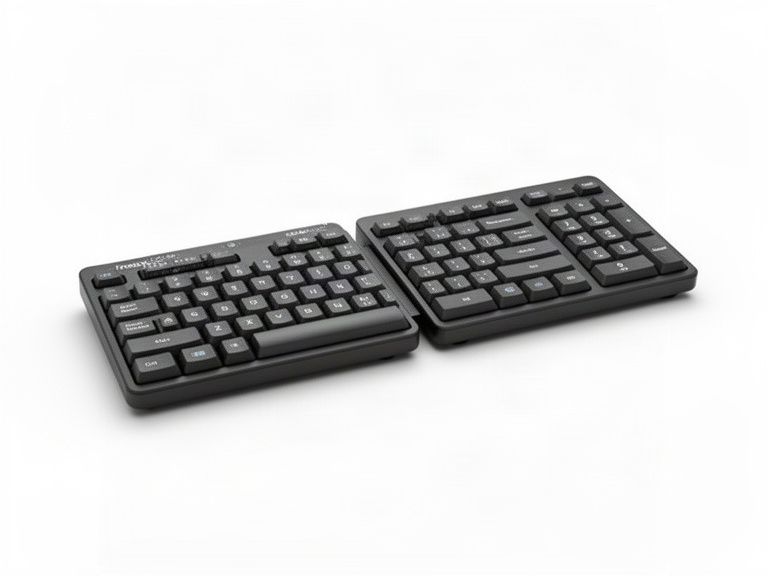
Kinesis Freestyle2 Split Keyboard
Kinesis
A compact, fully split low-profile keyboard whose halves can be spread apart and tented with an accessory kit.
Good for: Broad-shouldered typists and custom setups
- Halves separate to suit your shoulder width
- No number pad keeps the mouse close
- Low-profile keys feel familiar
- Tenting accessories let you fine-tune the angle
- Tenting needs an extra accessory
- No built-in palm rest on the base model
- Split layout takes some adjustment
The Kinesis Freestyle2 is a simple, flexible split keyboard. The two halves are joined by a cable, so you can spread them up to about 9 inches apart, or about 20 inches with the extended version, and set each half at an angle that keeps your wrists straight and shoulders open.
The keys are low-profile and laid out like a standard compact keyboard, which makes the transition easier than with a contoured design. There's no number pad, so your mouse sits closer to your body. Kinesis sells accessory kits that add tenting and palm supports, and there are Mac and Bluetooth versions.
On its own, the base model sits flat, so most people will want the tenting kit, which adds cost. If you want a split keyboard you can configure around your body, it's a proven choice.
The short version: A flexible, fully split keyboard for people who want to set their own width and angle.
AI picture- LayoutCurved split, full-size
- ConnectionWired USB
- Number padYes
- Palm restBuilt-in
#5Best budget8.0/10
Perixx Periboard-512 Ergonomic Split Keyboard
Perixx · Model Periboard-512
A budget-friendly wired one-piece split keyboard with a curved layout, a built-in palm rest and a number pad.
Good for: Trying a split design on a tight budget
- Very budget-friendly way to try a split layout
- Built-in palm rest
- Full-size with a number pad
- Wired, so no batteries or pairing
- Membrane keys feel softer and less precise
- Large footprint
- Basic build quality
The Perixx Periboard-512 is a long-running, budget-friendly split keyboard in the style of the classic natural keyboards. The one-piece body splits and curves the keys, raises the middle slightly and includes a built-in palm rest, giving you a taste of an ergonomic layout without a big investment.
It's wired over USB, so there's nothing to charge or pair, and it includes a full number pad and multimedia keys. The membrane keys feel softer than the scissor or mechanical keys on pricier boards, and the plastic build is basic.
Like other full-size split keyboards, it takes up a lot of room and pushes your mouse outward. If you want to find out whether a split layout suits you before spending more, it's a sensible place to start.
The short version: An inexpensive way to try a split ergonomic keyboard before committing to a premium model.
Compare at a glance
| Pick | Layout | Connection | Number pad | Tilt | Score |
|---|---|---|---|---|---|
| #1 Logitech Ergo K860 Split Ergonomic Keyboard | Curved split, full-size | Bluetooth + USB receiver | Yes | Negative-tilt legs at the front | 9.1 |
| #2 Kinesis Advantage360 Contoured Split Keyboard | Contoured split with key wells | Wired or wireless, depending on edition | No (embedded keypad layer) | — | 8.9 |
| #3 Logitech Wave Keys Wireless Ergonomic Keyboard | Wave-shaped, full-size | Bluetooth + Logi Bolt receiver | Yes | — | 8.8 |
| #4 Kinesis Freestyle2 Split Keyboard | Fully split, compact | Wired USB (Bluetooth version available) | No | — | 8.6 |
| #5 Perixx Periboard-512 Ergonomic Split Keyboard | Curved split, full-size | Wired USB | Yes | — | 8.0 |
Specs come from manufacturer listings when we wrote this guide and can change between production runs.
Buying tips
The main ergonomic designs
- Wave or gently curved keyboards keep a normal layout with a slight curve and a raised palm rest. They're the easiest to adapt to.
- Curved split keyboards are one piece, but angle each half of the keys outward and raise the middle, designed to reduce wrist bend while keeping everything joined.
- Fully split keyboards separate into two halves you can place about shoulder-width apart and, with accessories, tent upward.
- Contoured keyboards sink the keys into a well for each hand and add thumb clusters. They're the biggest change and the steepest learning curve.
Tilt: negative and tenting
Most standard keyboards tilt up at the back, which bends your wrists upward. Ergonomic designs often offer negative tilt, with the front higher than the back, and tenting, which raises the middle so your palms face slightly inward. Both are designed to reduce wrist extension and forearm rotation. Start with small angles and increase only if it feels better.
Number pad or not?
A built-in number pad pushes your mouse farther to the right, which can mean reaching with your shoulder all day. If you rarely enter numbers, a keyboard without one, or with a separate keypad, keeps the mouse closer. If you do a lot of data entry, a full-size ergonomic board is still a step up from a flat one.
Wireless or wired?
Wireless keyboards with Bluetooth and a USB receiver keep the desk tidy and can pair with several devices. Wired models never need batteries and are often budget-friendly. Split keyboards are usually connected to each other by a cable even when the computer link is wireless.
Easing into a new keyboard
Expect slower typing for a few days with curved designs and a few weeks with fully split or contoured layouts. Practice in short sessions, keep your old keyboard nearby for urgent work, and resist the urge to give up after day two. Look at your whole setup, too: chair height, elbows at about 90 degrees, shoulders relaxed and the screen at eye level.
Pair it with the right mouse
An ergonomic keyboard works best with a mouse you can reach without stretching. A keyboard without a number pad, a vertical mouse or trackball, or a mouse placed between the halves of a split keyboard can all help keep your arm closer to your body.
FAQ
QWill an ergonomic keyboard help with wrist pain?
Ergonomic keyboards are designed to reduce wrist bend and forearm twisting, and many people find them more comfortable. They are not a treatment for any condition, though. If you have ongoing pain, numbness or tingling, see a doctor or occupational therapist for advice.
QHow long does it take to get used to a split keyboard?
Most people adapt to a curved or wave keyboard within a few days. Fully split and contoured keyboards often take two to four weeks to get back to full speed, especially if you never learned to touch-type with the correct hand for each key.
QCan I use an ergonomic keyboard with a Mac?
Usually, yes. Logitech’s ergonomic keyboards support macOS with Mac key labels or layouts, and Kinesis sells Mac versions or offers a Mac mode on several models. Check the listing for macOS support and the correct modifier keys.
QShould I rest my palms on the palm rest while typing?
Use the palm rest during pauses rather than planting your wrists on it while you type. Hovering slightly and moving from the arm while typing helps avoid bending your wrists upward.
QAre ergonomic keyboards good for gaming?
They can work, but split and curved layouts can feel awkward in games that rely on the left side of the keyboard. Fully split models let you use only the left half, which some gamers like.
How we picked
We compared manufacturer specifications for well-known ergonomic keyboards, including design type, split and tenting options, tilt settings, palm rests, number pad, connection, power and Mac compatibility, and weighed how each suits different typists and learning curves. We make no health claims for any keyboard. Our picks and scores are based on this research — we have not tested these products hands-on. Brands cannot pay to be included. Read our full method.
In the same aisle
More ergonomic keyboards to browse
A random pull from our product catalog, not ranked or reviewed.