Best Wireless Mice in 2026
Six wireless mice compared for work, travel and Mac use, from feature-packed productivity mice to slim, quiet and budget-friendly picks.
- 6 picks
- 6 min read
- Updated Nov 20, 2026

As an Amazon Associate I earn from qualifying purchases. If you buy through a link here we may earn a commission, at no extra cost to you. Details
A good wireless mouse is one of the most-used and least-considered parts of a desk setup. The right one fits your hand, glides reliably on your desk, scrolls through long documents without effort and switches between computers when you need it to. The wrong one cramps your hand or needs new batteries every few weeks.
Wireless mice now fall into a few clear groups: full-size productivity mice with extra buttons and fast scroll wheels, compact mice for laptop bags, quiet budget-friendly mice for everyday use, and Apple's touch-surface Magic Mouse for Macs. We compared well-known models from Logitech and Apple on size and shape, connection, battery, scrolling and buttons, and picked the best for different hands and habits. If you're mainly interested in a vertical mouse or trackball, see our separate guide to ergonomic mice.
The lineup
 Best overall Logitech MX Master 3S Wireless Mouse
Office workers, creators and multi-computer setups
9.3 Buy Now on Amazon
 Best newest flagship Logitech MX Master 4 Wireless Mouse
Power users of Adobe apps and shortcut-heavy workflows
9.1 Buy Now on Amazon
 Best for travel Logitech MX Anywhere 3S Compact Wireless Mouse
Laptop users, travelers and smaller hands
8.9 Buy Now on Amazon
 Best value Logitech Signature M650 Wireless Mouse
Everyday home and office use
8.7 Buy Now on Amazon
 Best slim budget pick Logitech Pebble Mouse 2 M350s
Students and minimalist laptop setups
8.3 Buy Now on Amazon
AI picture
- SizeFull-size, right-handed
- ConnectionBluetooth + Logi Bolt receiver
- PowerRechargeable (USB-C), up to 70 days
- Sensor8,000 DPI, tracks on glass
- ExtrasQuiet clicks, MagSpeed wheel, thumb wheel
#1Best overall9.3/10
Logitech MX Master 3S Wireless Mouse
Logitech
A full-size productivity mouse with quiet clicks, a fast electromagnetic scroll wheel, a thumb wheel and three-device switching.
Good for: Office workers, creators and multi-computer setups
- MagSpeed wheel flies through long documents and clicks back to precise scrolling
- Thumb wheel for horizontal scrolling in spreadsheets and timelines
- Quiet clicks
- Pairs with up to three computers
- Right-handed only
- Too large for small hands
- Heavier than compact mice
The MX Master 3S has been the default recommendation for productivity mice for years, and it remains the most dependable choice. Its sculpted, full-size shape supports your whole hand, and the electromagnetic MagSpeed scroll wheel spins freely through long documents, then switches to precise line-by-line scrolling.
A thumb wheel handles horizontal scrolling in spreadsheets and video timelines, and the extra buttons can be customized per app with Logitech's Options+ software. The clicks are quiet, the 8,000 DPI sensor tracks on glass, and you can pair it with up to three computers over Bluetooth or the included Logi Bolt receiver. A full charge is rated for up to 70 days.
It's right-handed only and big, so smaller hands may prefer the MX Anywhere 3S. Logitech's newer MX Master 4 adds haptic feedback, but the 3S remains well proven and widely available.
The short version: The best wireless mouse for most people who work at a computer all day.
AI picture- SizeFull-size, right-handed
- ConnectionBluetooth + Logi Bolt receiver
- PowerRechargeable (USB-C), up to 70 days
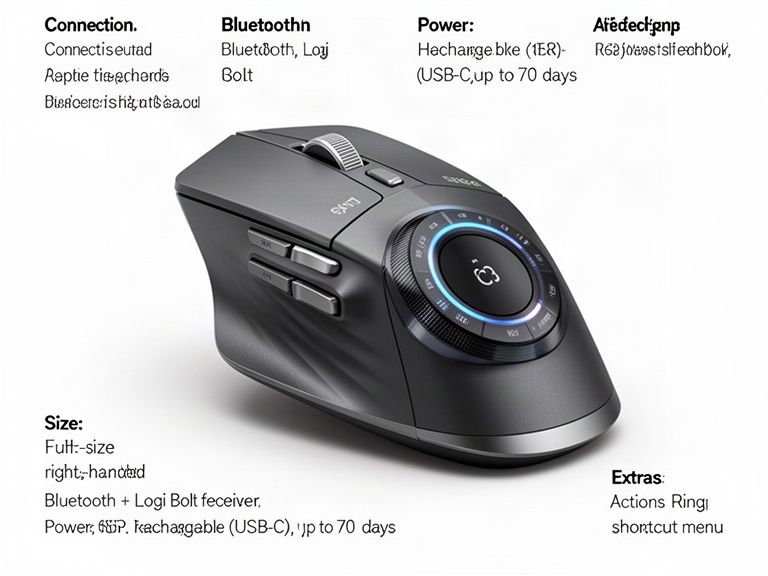
- ExtrasHaptic feedback, Actions Ring shortcut menu
- VersionsStandard, Mac and Business
#2Best newest flagship9.1/10
Logitech MX Master 4 Wireless Mouse
Logitech
Logitech’s newest flagship productivity mouse, adding haptic feedback and a pop-up Actions Ring shortcut menu.
Good for: Power users of Adobe apps and shortcut-heavy workflows
- Haptic feedback adds subtle vibrations for scrolling and actions
- Actions Ring puts app shortcuts under your thumb
- Familiar MX Master shape and scrolling
- Mac and Business versions available
- Haptic features work in a limited set of apps so far
- Premium-priced
- Right-handed only
The MX Master 4 is Logitech's 2025 update to its flagship productivity mouse. It keeps the familiar sculpted shape and fast scrolling, and adds two new ideas: haptic feedback from a small motor under the thumb rest, and a pressable button there that opens the Actions Ring, a circular on-screen menu of shortcuts you set up in Logi Options+.
The haptics give subtle vibrations for things like scrolling, snapping and notifications. App support was limited at launch, with Adobe apps and Zoom among the first, so how much you benefit depends on the software you use. Battery life is rated at up to 70 days per charge, and a one-minute charge gives several hours.
If you mostly want a great all-day mouse, the 3S does nearly everything for less. If you live in supported apps and love shortcuts, the 4 is the more advanced tool.
The short version: The most advanced productivity mouse here, best for shortcut-heavy users in supported apps.
AI picture- SizeCompact, ambidextrous shape
- ConnectionBluetooth (Logi Bolt compatible)
- PowerRechargeable (USB-C), up to 70 days
- Sensor8,000 DPI, tracks on glass
- ExtrasQuiet clicks, MagSpeed wheel
#3Best for travel8.9/10
Logitech MX Anywhere 3S Compact Wireless Mouse
Logitech
A compact, rechargeable mouse with a fast MagSpeed wheel, quiet clicks and a sensor that tracks on glass.
Good for: Laptop users, travelers and smaller hands
- Small enough for a jacket pocket or laptop sleeve
- MagSpeed wheel in a compact body
- Tracks on glass and glossy surfaces
- Quiet clicks
- Too small for a relaxed palm grip on large hands
- No thumb wheel
- Side buttons sit on the left only
The MX Anywhere 3S packs much of the MX Master's appeal into a mouse small enough to carry everywhere. It has the same style of fast MagSpeed scroll wheel, a high-resolution sensor that tracks on glass and glossy tables, and quiet clicks that won't bother anyone in a café or on a call.
It pairs over Bluetooth with up to three devices and works with a Logi Bolt receiver, and its USB-C battery is rated for up to 70 days per charge. The compact, fairly symmetrical shape suits fingertip and claw grips and smaller hands.
There's no horizontal thumb wheel, and people with large hands may find it cramped for all-day use at a desk. As a travel mouse, or a desk mouse for smaller hands, it's the best compact option.
The short version: The best compact wireless mouse for laptop users who want premium scrolling on the go.
AI picture- SizeMid-size (L version for large hands)
- ConnectionBluetooth + Logi Bolt receiver
- Power1 AA battery, up to 24 months
- ExtrasSilentTouch quiet clicks, SmartWheel
#4Best value8.7/10
Logitech Signature M650 Wireless Mouse
Logitech · Model M650
A comfortable, quiet mid-size mouse with a smart scroll wheel and up to two years of battery life on one AA.
Good for: Everyday home and office use
- Quiet clicks for shared spaces
- SmartWheel switches between precise and fast scrolling
- AA battery rated for up to two years
- Large and left-handed versions available
- Only two side buttons
- No multi-device switching button
- Plainer shape than premium mice
The Signature M650 is the mouse to buy if you want something comfortable and quiet without paying for flagship features. Its SilentTouch clicks are much quieter than a standard mouse, and the SmartWheel switches between precise line-by-line scrolling and fast free spinning when you flick it.
It connects over Bluetooth or the included Logi Bolt receiver and runs on a single AA battery rated for up to two years, so you'll rarely think about power. Logitech sells it in a standard size and an M650 L version for larger hands, including a left-handed L model.
You don't get the MX series' extra buttons, thumb wheel or quick multi-device switching. For everyday browsing, email and documents, though, it covers the essentials with a comfortable shape at a budget-friendly price.
The short version: The best-value wireless mouse for comfortable, quiet everyday use.
AI picture- SizeSlim, ambidextrous
- ConnectionBluetooth
- Power1 AA battery, up to 24 months
- ExtrasQuiet clicks, customizable middle button
#5Best slim budget pick8.3/10
Logitech Pebble Mouse 2 M350s
Logitech · Model M350s
A slim, quiet and budget-friendly Bluetooth mouse that slips into any bag.
Good for: Students and minimalist laptop setups
- Very slim and light for travel
- Quiet clicks
- Long AA battery life
- Budget-friendly
- Flat shape is less comfortable for long sessions
- Bluetooth only, no USB receiver
- No side buttons
The Pebble Mouse 2 M350s is a minimalist mouse that does a few things well. It's slim and light enough to disappear into a pencil case or laptop sleeve, its clicks are quiet, and a single AA battery is rated for up to two years.
It connects over Bluetooth only and can switch between three paired devices with a button on top. The symmetrical shape works in either hand, and the middle button can be customized in Logitech's software.
The trade-off for that slim profile is comfort. A flat mouse makes your hand arch more than a full-size one, so it's better for short sessions and travel than for eight-hour workdays. As a budget-friendly companion for a laptop or tablet, it's a great pick.
The short version: A budget-friendly, pocketable mouse for travel, study and light use.
 AI picture
- SizeLow-profile, ambidextrous
- ConnectionBluetooth
- PowerRechargeable (USB-C on current model)
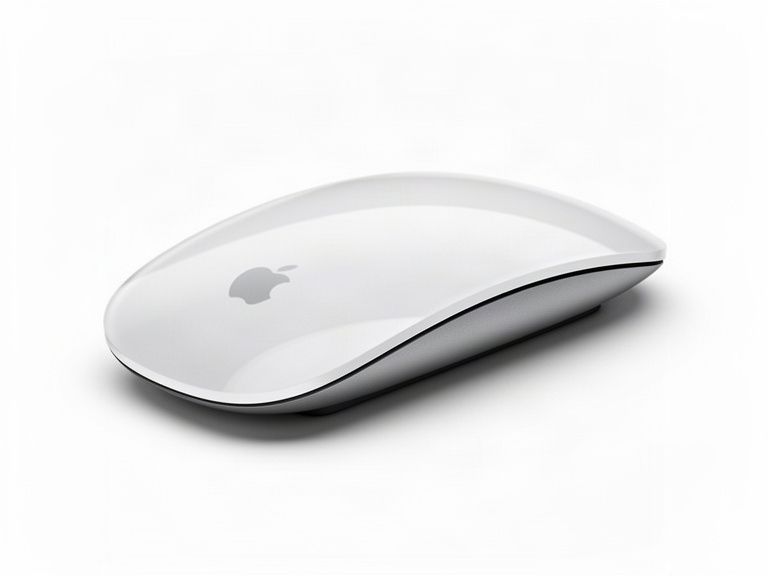
- ExtrasMulti-Touch surface for gestures
#6Best for Mac8.2/10
Apple Magic Mouse
Apple
Apple’s low-profile mouse with a Multi-Touch surface for scrolling and swiping gestures in macOS.
Good for: Mac users who love trackpad-style gestures
- Multi-Touch surface supports swiping between pages and apps
- Pairs seamlessly with Macs
- Slim, minimalist design
- Rechargeable battery
- Charging port is underneath, so you can't use it while charging
- Low, flat shape is uncomfortable for some hands
- Limited functions outside macOS
The Magic Mouse is the natural partner for a Mac if you like gestures. Its smooth top is a Multi-Touch surface, so you scroll in any direction by sliding a finger and swipe between pages, apps and desktops just as you would on a trackpad. It pairs with a Mac almost instantly and needs no software.
The current version charges over USB-C, and a short charge lasts a long time. The catch is where the port is: underneath, so the mouse can't be used while it's plugged in. The very low, flat shape is also divisive. Some people love it, while others find it cramps their hand over long sessions.
If you want gestures and Apple's design, it's the obvious choice. If comfort matters more, a Logitech MX mouse works well with macOS too.
The short version: The best mouse for Mac users who want trackpad-style gestures in a mouse.
Compare at a glance
| Pick | Size | Connection | Power | Sensor | Score |
|---|---|---|---|---|---|
| #1 Logitech MX Master 3S Wireless Mouse | Full-size, right-handed | Bluetooth + Logi Bolt receiver | Rechargeable (USB-C), up to 70 days | 8,000 DPI, tracks on glass | 9.3 |
| #2 Logitech MX Master 4 Wireless Mouse | Full-size, right-handed | Bluetooth + Logi Bolt receiver | Rechargeable (USB-C), up to 70 days | — | 9.1 |
| #3 Logitech MX Anywhere 3S Compact Wireless Mouse | Compact, ambidextrous shape | Bluetooth (Logi Bolt compatible) | Rechargeable (USB-C), up to 70 days | 8,000 DPI, tracks on glass | 8.9 |
| #4 Logitech Signature M650 Wireless Mouse | Mid-size (L version for large hands) | Bluetooth + Logi Bolt receiver | 1 AA battery, up to 24 months | — | 8.7 |
| #5 Logitech Pebble Mouse 2 M350s | Slim, ambidextrous | Bluetooth | 1 AA battery, up to 24 months | — | 8.3 |
| #6 Apple Magic Mouse | Low-profile, ambidextrous | Bluetooth | Rechargeable (USB-C on current model) | — | 8.2 |
Specs come from manufacturer listings when we wrote this guide and can change between production runs.
Buying tips
Size and grip
Hand size matters more than any spec. Full-size mice suit medium to large hands and a relaxed palm grip, where your whole hand rests on the mouse. Compact mice suit smaller hands, fingertip grips and travel. Some models come in more than one size, such as a large version for bigger hands, and a few offer a left-handed edition. If you already own a mouse you find comfortable, compare its length and width with the spec sheet of any mouse you're considering. Weight matters less for office work than for gaming, but a lighter mouse is easier to carry and move all day.
Bluetooth or USB receiver?
- Bluetooth needs no dongle and pairs with laptops, tablets and phones. It's ideal for travel, though the connection can take a moment to wake.
- A USB receiver, such as Logitech's Logi Bolt, is steadier in offices crowded with wireless devices and works before the operating system loads.
- Multi-device mice pair with two or three computers and switch between them with a button.
If your laptop has only USB-C ports, check the receiver's plug. Many receivers are still USB-A, so you'll need a small adapter or a hub, or you can simply use Bluetooth. Some productivity mice don't include a receiver at all and sell it separately.
Rechargeable or batteries?
Rechargeable mice with USB-C are convenient, and a quick top-up often gives hours of use. AA-battery mice can run for a year or more on one battery, which suits people who forget to charge things. Check where the charging port is: if it's underneath, you can't use the mouse while it charges.
Scroll wheel and buttons
A free-spinning or electromagnetic scroll wheel flies through long documents and spreadsheets, then clicks back into precise line-by-line scrolling. A horizontal scroll wheel or tilt wheel helps with wide spreadsheets and timelines. Programmable thumb buttons can handle back and forward, copy and paste or app-specific shortcuts through the maker's software.
Quiet clicks and tracking
Silent or quiet-click mice cut click noise sharply, which helps in shared offices, libraries and on calls. A high-resolution sensor that tracks on glass is useful if you work at cafés, on glossy tables or without a mouse pad.
Care tips
Wipe the mouse with a slightly damp cloth, clean the feet now and then, and keep the sensor window free of dust and hair. If your mouse has a slot for its USB receiver, store the receiver there when traveling so it doesn't get lost.
FAQ
QIs Bluetooth or a USB receiver better for a mouse?
A USB receiver usually gives a steadier connection in busy offices and works in BIOS or startup screens. Bluetooth frees up a USB port and pairs with tablets and phones. Many productivity mice support both, so you can use the receiver at your desk and Bluetooth on the road.
QDo Logitech mice work with a Mac?
Yes. Logitech’s mice work with macOS over Bluetooth or a Logi Bolt receiver, and the Logi Options+ app lets you customize buttons and scrolling on a Mac. Some models are also sold in Mac-specific versions.
QHow long do wireless mouse batteries last?
It varies widely. Rechargeable productivity mice are typically rated for weeks to a couple of months per charge, while some AA-powered mice are rated for up to two years on one battery. Real-world life depends on how much you use the mouse.
QDo I need a mouse pad?
Not with most modern mice, especially those that track on glass. A pad still helps on very glossy, patterned or uneven surfaces, gives smoother glide and protects the desk.
QWhat is Logi Bolt?
Logi Bolt is Logitech’s current USB wireless receiver, designed for a secure, stable connection in busy wireless environments. It replaces the older Unifying receiver on newer Logitech mice and keyboards, and the two are not interchangeable.
How we picked
We compared manufacturer specifications for popular wireless mice, including size and handedness, connection options, battery type and rated life, sensor, scroll wheel, button layout and click noise, and weighed how each suits office work, travel and Mac users. Our picks and scores are based on this research — we have not tested these products hands-on. Brands cannot pay to be included. Read our full method.
In the same aisle
More wireless mice to browse
A random pull from our product catalog, not ranked or reviewed.