Best Gaming Mice in 2026
Six gaming mice compared, from featherweight wireless esports shapes to an MMO mouse with a 12-button side plate and a budget wireless pick that runs on one AA battery.
- 6 picks
- 6 min read
- Updated Nov 20, 2026

As an Amazon Associate I earn from qualifying purchases. If you buy through a link here we may earn a commission, at no extra cost to you. Details
A gaming mouse comes down to three things: a shape that fits your hand, a sensor that tracks exactly what you do, and a connection that does not add lag. Two of those are largely solved. Current optical sensors from Logitech, Razer and SteelSeries track far beyond what any hand can use, and modern 2.4 GHz wireless is effectively as responsive as a cable.
That leaves shape, weight and buttons as the real decisions, and they depend on how you play. A competitive shooter player wants something light and simple. An MMO player wants a grid of thumb keys for abilities. Someone who games and works at the same desk may care more about a free-spinning scroll wheel and extra buttons for shortcuts. We compared the most popular, consistently available gaming mice across those use cases and picked the strongest option for each, with notes on hand size and grip so you can narrow the list quickly.
The lineup
 Best overall Logitech G Pro X Superlight 2 Wireless
Competitive shooter players
9.4 Buy Now on Amazon
 Best ergonomic Razer DeathAdder V3 Pro Wireless
Palm-grip players with medium to large hands
9.2 Buy Now on Amazon
 Best wired Logitech G502 HERO Wired
Players who want lots of buttons on a fixed desktop
8.9 Buy Now on Amazon
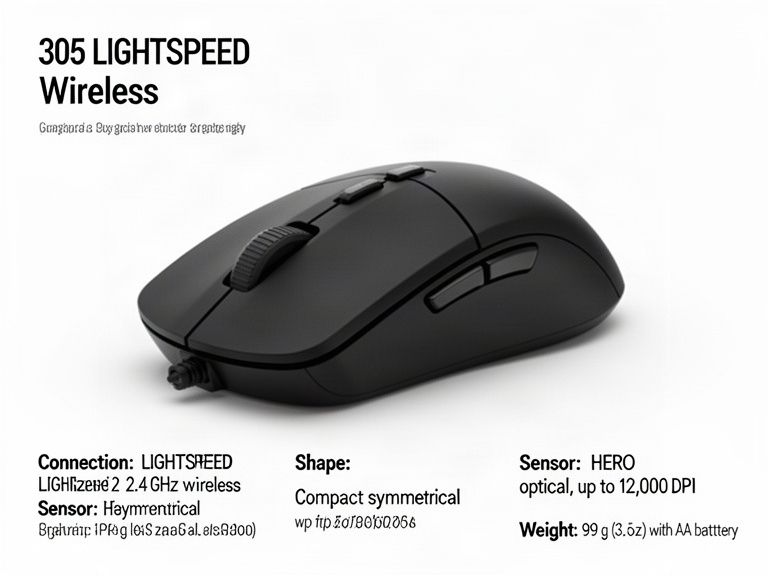 Best budget wireless Logitech G305 LIGHTSPEED Wireless
First gaming mouse, laptops and tight budgets
8.7 Buy Now on Amazon
 Best for MMOs Razer Naga V2 Pro Wireless MMO Mouse
MMO and MOBA players who need many binds
8.6 Buy Now on Amazon
 Best for gaming and travel SteelSeries Aerox 3 Wireless
Laptop gamers who switch between devices
8.3 Buy Now on Amazon
AI picture
- ConnectionLIGHTSPEED 2.4 GHz wireless
- ShapeSymmetrical, side buttons on left
- SensorHERO 2 optical
- WeightAbout 60 g (2.1 oz)
- BatteryUp to 95 hours (maker)
#1Best overall9.4/10
Logitech G Pro X Superlight 2 Wireless
Logitech G
A roughly 60-gram symmetrical wireless mouse with a simple shape, a top-tier sensor and long battery life.
Good for: Competitive shooter players
- Very light for a full-size wireless mouse
- Safe, simple shape suits claw and fingertip grips
- Hybrid optical-mechanical switches avoid double-click faults
- USB-C charging and long battery life
- Onboard memory keeps settings without software running
- Only two side buttons and no lighting
- Side buttons sit on the left only
- Premium-priced
The Superlight line became the default esports mouse by doing very little: a plain, symmetrical shell, a sensor that never gets in the way, and almost no weight. The second generation keeps that formula and updates the internals, with Logitech's HERO 2 sensor, hybrid optical-mechanical switches that sidestep the double-click problem, and USB-C charging.
At about 60 grams it is easy to move quickly over a large pad at low sensitivity, which is how many shooter players aim. Battery life is rated at up to 95 hours, so most people charge it once a week or so.
What you give up is versatility. There are just two side buttons, no lighting and no adjustable weights. Palm grippers with large hands may find the low, even shape less supportive than a sculpted ergonomic mouse.
The short version: The easiest recommendation for shooter players who want a light, reliable wireless mouse with nothing extra to get in the way.
AI picture- ConnectionHyperSpeed 2.4 GHz wireless
- ShapeErgonomic, right-handed
- SensorFocus Pro 30K optical
- WeightAbout 63 g (2.2 oz)
- BatteryUp to 90 hours (maker)
#2Best ergonomic9.2/10
Razer DeathAdder V3 Pro Wireless
Razer
A light, right-handed ergonomic wireless mouse that keeps the classic DeathAdder shape at a fraction of the old weight.
Good for: Palm-grip players with medium to large hands
- Comfortable sculpted shape for palm and relaxed claw grips
- Very light for an ergonomic mouse
- Optical switches resist double-clicking
- Solid shell with no holes for dust to get in
- Right-handed only
- Just two side buttons
- Premium-priced
The DeathAdder shape has been a favorite for palm grippers for well over a decade, and the V3 Pro trims it into a modern esports mouse. The shell is a little flatter and more angular than older DeathAdders but keeps the gentle slope toward the thumb that lets your whole hand rest on the mouse.
The headline is weight: about 63 grams with no perforated holes, which is remarkable for a full-size ergonomic shell. Razer's Focus Pro 30K sensor and optical switches round out a spec sheet that leaves little to want for competitive play, and battery life is rated at up to 90 hours.
As with most esports mice, it is deliberately sparse: two side buttons, no lighting, and a shape that only suits the right hand.
The short version: The pick for right-handed players who want a supportive ergonomic shape without the weight that usually comes with it.
AI picture- ConnectionWired USB
- ShapeErgonomic, right-handed
- SensorHERO 25K optical
- Weight121 g (4.3 oz) plus five 3.6 g weights
- Buttons11 programmable
#3Best wired8.9/10
Logitech G502 HERO Wired
Logitech G
A long-running wired mouse with 11 programmable buttons, a free-spinning scroll wheel and adjustable weights.
Good for: Players who want lots of buttons on a fixed desktop
- Eleven programmable buttons, including a sniper button
- Scroll wheel switches between notched and free-spin
- Adjustable weights to tune the feel
- Mid-priced for its feature set
- Onboard memory for saved profiles
- Heavy compared with modern esports mice
- Cable adds drag without a bungee
- Right-handed only
The G502 has been one of the most popular gaming mice for years because it does a bit of everything. Eleven programmable buttons cover shooter, MMO and productivity needs; a dedicated "sniper" button drops sensitivity while held; and the metal scroll wheel can be unlocked to spin freely through long pages.
At 121 grams before the optional weights it is far heavier than current esports mice, and that is a matter of taste: some players like the planted feel, others find it tiring in fast shooters. The HERO 25K sensor is fully up to competitive play either way.
Being wired keeps it mid-priced and removes battery worries. A mouse bungee helps keep the cable from dragging. If you want the same shape without the cable, Logitech sells wireless G502 versions at a higher price.
The short version: The best all-rounder for a fixed desk if you want lots of buttons and do not mind a heavier mouse.
AI picture- ConnectionLIGHTSPEED 2.4 GHz wireless
- ShapeCompact symmetrical
- SensorHERO optical, up to 12,000 DPI
- Weight99 g (3.5 oz) with AA battery
- BatteryUp to 250 hours on one AA (maker)
#4Best budget wireless8.7/10
Logitech G305 LIGHTSPEED Wireless
Logitech G · Model G305
A compact wireless gaming mouse with a proper gaming sensor that runs for months on a single AA battery.
Good for: First gaming mouse, laptops and tight budgets
- Same low-lag wireless as Logitech's pricier mice
- Very long runtime on one AA battery
- Receiver stores inside the mouse for travel
- Budget-friendly
- Compact shape is small for large hands
- Heavier than rechargeable esports mice
- No rechargeable battery
The G305 proves that a good wireless gaming mouse does not have to be expensive. It uses the same LIGHTSPEED wireless as Logitech's flagship mice and a HERO sensor that is more than accurate enough for any game, in a small, simple shell with six programmable buttons.
Power comes from a single AA battery rated for up to 250 hours of play, which works out to months for most people. The trade-off is weight: about 99 grams with the battery, noticeably more than modern esports mice. Swapping in a lithium AA trims a little.
The shape is short and narrow, ideal for small to medium hands and claw or fingertip grips, and the receiver tucks inside the mouse so it is easy to throw in a laptop bag.
The short version: The best way to get low-lag wireless gaming on a budget, especially for smaller hands.
AI picture- ConnectionHyperSpeed 2.4 GHz wireless, Bluetooth
- ShapeErgonomic, right-handed
- SensorFocus Pro 30K optical
- Side plates3 magnetic: 2, 6 and 12 buttons
- BatteryUp to 150 hours HyperSpeed, 300 Bluetooth (maker)
#5Best for MMOs8.6/10
Razer Naga V2 Pro Wireless MMO Mouse
Razer
A wireless MMO mouse with three magnetic side plates: 2, 6 or 12 thumb buttons.
Good for: MMO and MOBA players who need many binds
- Swappable side plates cover MMOs, MOBAs and shooters
- Twelve-button grid puts a full ability bar under your thumb
- Scroll wheel with free-spin and tilt
- Wireless with long battery life
- Heavy at about 134 grams
- Premium-priced
- Right-handed only
MMO players need far more binds than a standard mouse offers, and the Naga V2 Pro solves that with magnetic side plates. The 12-button grid puts a full ability bar under your thumb, the 6-button ring suits MOBAs and action games, and the 2-button plate turns it into a conventional mouse for shooters.
It is wireless, with Razer's HyperSpeed receiver for games and Bluetooth for a laptop, and the battery is rated for up to 150 hours on HyperSpeed. The scroll wheel can switch between notched and free-spinning, which helps in spreadsheets as much as in games.
The cost is weight. At about 134 grams it is a heavy mouse that suits slower-paced games better than fast shooters, where big low-sensitivity sweeps become tiring. It is also expensive for a mouse.
The short version: The most flexible choice for MMO and MOBA players who want every ability on the mouse.
AI picture- ConnectionQuantum 2.0 wireless, Bluetooth
- ShapeSymmetrical, perforated shell
- SensorTrueMove Air optical
- WeightAbout 68 g (2.4 oz)
- Water resistanceIP54 (maker)
#6Best for gaming and travel8.3/10
SteelSeries Aerox 3 Wireless
SteelSeries
A light, perforated wireless mouse with both a 2.4 GHz receiver and Bluetooth, plus water and dust resistance.
Good for: Laptop gamers who switch between devices
- Light for a mouse with dual wireless modes
- Bluetooth for laptops, 2.4 GHz for games
- IP54 rating helps against dust and splashes
- Compact shape suits claw and fingertip grips
- Perforated shell shows dust and collects crumbs
- Small for large hands
- Lighting adds little and costs battery life
The Aerox 3 Wireless is a smart pick if one mouse has to cover a gaming desktop and a laptop bag. It pairs over SteelSeries' Quantum 2.0 receiver for low-lag gaming and switches to Bluetooth for a work laptop or tablet, all in a shell that weighs about 68 grams.
The holes in the shell are what keep it light, and SteelSeries has sealed the internals to an IP54 rating against dust and splashes, which is unusual for a perforated mouse. You will still see dust on the board through the holes, and crumbs can get in if you eat at your desk.
It is a compact, low shape that suits claw and fingertip grips best. Turn the lighting off and battery life stretches noticeably.
The short version: A light, versatile wireless mouse for players who game on a laptop as often as on a desktop.
Compare at a glance
| Pick | Connection | Shape | Sensor | Weight | Score |
|---|---|---|---|---|---|
| #1 Logitech G Pro X Superlight 2 Wireless | LIGHTSPEED 2.4 GHz wireless | Symmetrical, side buttons on left | HERO 2 optical | About 60 g (2.1 oz) | 9.4 |
| #2 Razer DeathAdder V3 Pro Wireless | HyperSpeed 2.4 GHz wireless | Ergonomic, right-handed | Focus Pro 30K optical | About 63 g (2.2 oz) | 9.2 |
| #3 Logitech G502 HERO Wired | Wired USB | Ergonomic, right-handed | HERO 25K optical | 121 g (4.3 oz) plus five 3.6 g weights | 8.9 |
| #4 Logitech G305 LIGHTSPEED Wireless | LIGHTSPEED 2.4 GHz wireless | Compact symmetrical | HERO optical, up to 12,000 DPI | 99 g (3.5 oz) with AA battery | 8.7 |
| #5 Razer Naga V2 Pro Wireless MMO Mouse | HyperSpeed 2.4 GHz wireless, Bluetooth | Ergonomic, right-handed | Focus Pro 30K optical | — | 8.6 |
| #6 SteelSeries Aerox 3 Wireless | Quantum 2.0 wireless, Bluetooth | Symmetrical, perforated shell | TrueMove Air optical | About 68 g (2.4 oz) | 8.3 |
Specs come from manufacturer listings when we wrote this guide and can change between production runs.
Buying tips
Start with shape and grip
Gaming mice come in two broad shapes. Ergonomic mice are sculpted for the right hand, with a hump that leans toward your thumb; they suit a relaxed palm grip. Symmetrical mice are mirror-image shells that work well for claw and fingertip grips, although most still put the side buttons on the left only, so true left-hand use is limited.
Hand size matters more than any spec. Measure from your wrist crease to the tip of your middle finger: larger hands usually prefer longer mice they can palm, while smaller hands often get on better with compact shells held by the fingertips. Compare the maker's length and width figures to a mouse you already like.
Weight: lighter is not automatically better
Esports mice now sit around 60 grams. Less mass makes fast flicks and big arm swipes at low sensitivity less tiring, which is why shooter players prize it. Heavier mice of 100 grams or more feel steadier to some people, especially for slower games, and a few models let you add or remove weights. Perforated "honeycomb" shells cut weight but let dust and crumbs inside.
Wired or wireless?
Proprietary 2.4 GHz wireless — Logitech LIGHTSPEED, Razer HyperSpeed, SteelSeries Quantum 2.0 — is fast enough for competitive play. Bluetooth is slower and best kept for laptops and office work. A rechargeable mouse needs a cable every week or two; an AA-powered one runs for months but is heavier. Wired mice cost less for the same sensor and never need charging, so they still make sense on a fixed desktop.
Specs that matter, and specs that do not
- DPI: most players use somewhere between 400 and 1,600. Ceiling figures of 25,000 or 30,000 are marketing; any current gaming sensor is accurate enough.
- Polling rate: 1,000 Hz is the standard. Higher rates of 4,000 or 8,000 Hz can feel smoother on high-refresh monitors but cost battery life and some CPU time.
- Switches: optical or hybrid switches avoid the double-click fault that older mechanical mouse switches can develop.
- Onboard memory: saves your DPI and button settings on the mouse, so it behaves the same on any PC without the software installed.
Buttons and software
Two side buttons cover most shooters. MMO and MOBA players benefit from a thumb grid, and productivity users like a tilting, free-spinning scroll wheel. Each brand has its own app (Logitech G HUB, Razer Synapse, SteelSeries GG) for remapping and lighting; check that it supports your operating system before you buy.
Care tips
Wipe the shell with a lightly damp cloth, and occasionally clean the sensor window and the PTFE feet with a dry cotton swab — grit on the feet causes scratchy glide. Worn feet can be replaced with aftermarket skates. A clean, decent-sized mouse pad does as much for tracking and glide as the mouse itself.
FAQ
QWhat DPI should I use for gaming?
There is no single right number. Many shooter players use 400 or 800 DPI with low in-game sensitivity for precise aim, while many others play comfortably at 1,600. Pick a setting where a comfortable arm or wrist movement turns you the distance you need, then stick with it so muscle memory can build.
QIs a wireless gaming mouse fast enough for competitive games?
Yes, as long as it uses the maker's 2.4 GHz receiver rather than Bluetooth. Current proprietary wireless from Logitech, Razer and SteelSeries is used at professional events. Keep the receiver close to the mouse, ideally on an extension adapter at the front of the desk.
QDo I need a 4,000 or 8,000 Hz polling rate?
No. A 1,000 Hz rate is fine for nearly everyone. Very high polling rates can feel slightly smoother on fast monitors, but they shorten battery life and use more CPU time, and older or busy PCs may stutter. Treat it as a nice extra rather than a reason to buy.
QCan left-handed players use these mice?
Ergonomic right-handed shapes are not suitable. Symmetrical mice fit the left hand, but most only have side buttons on the left side, where a left-handed player's pinky would sit. If you are left-handed, look for a truly ambidextrous model with buttons on both sides.
QDo gaming mice work on a Mac?
Basic pointing and clicking work on almost any computer. Customization software is another matter: support for macOS varies by brand and model, so check the maker's software page. Onboard memory helps, because settings saved on a Windows PC carry over.
How we picked
We compared manufacturer specifications for sensor, weight, connection type, battery life, button layout and shape dimensions, along with software and onboard-memory support, for widely available gaming mice from established brands, and weighed how each suits different grips and game types. Our picks and scores are based on this research — we have not tested these products hands-on. Brands cannot pay to be included. Read our full method.
In the same aisle
More gaming mice to browse
A random pull from our product catalog, not ranked or reviewed.